Electronic document management
Electronic document management not only solves the problem of paperless work but also puts the work processes of the organisation in order.
What an EDMS is for
Electronic document management is the life cycle of electronic documents in an organisation: from receipt (entry, e-mail) and passage through the departments with changes of state (brought to attention, approved, signed, in progress, closed) to archiving. An electronic document management system (EDMS) is often called a workflow system.
FossDoc is a solution on the FossLook platform for building an electronic document archive, organising corporate document flow and automating business processes in enterprises, institutions and organisations of any kind. The system is easy to adapt to the specifics of a particular organisation.
Client-server architecture
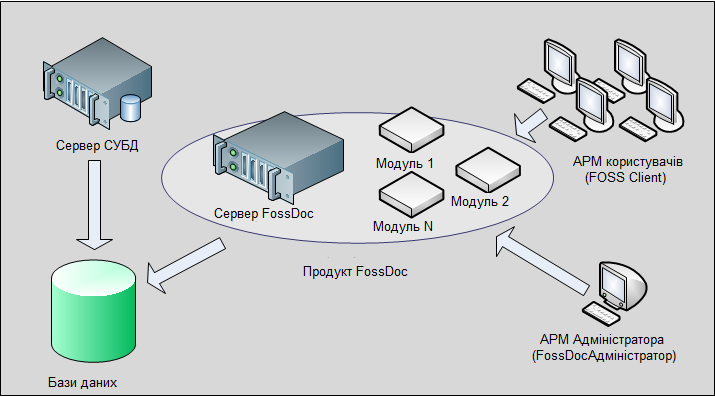
The FossDoc server is an application server with the business logic; the modules that define the functions of the system are plugged into it.
The web server provides work with the server in an ordinary browser. FossDoc Client is a Windows client application (the workplace of the user and a mail client at the same time). FossDoc Web Client is the same interface in a browser. FossDoc Administrator is the administration program: users, access rights, routes and new document types.
The database is MySQL, Microsoft SQL Server or Oracle: documents, reference books, users and settings.
Main functions
Registration and control cards, tasks, logs of paper originals, execution control, resolutions and reports.
Incoming and outgoing letters, citizen appeals, internal memos and orders. Documents can refer to each other, and fields are filled in from reference books.
Your own document types and print form templates; new documents based on existing ones through inheritance.
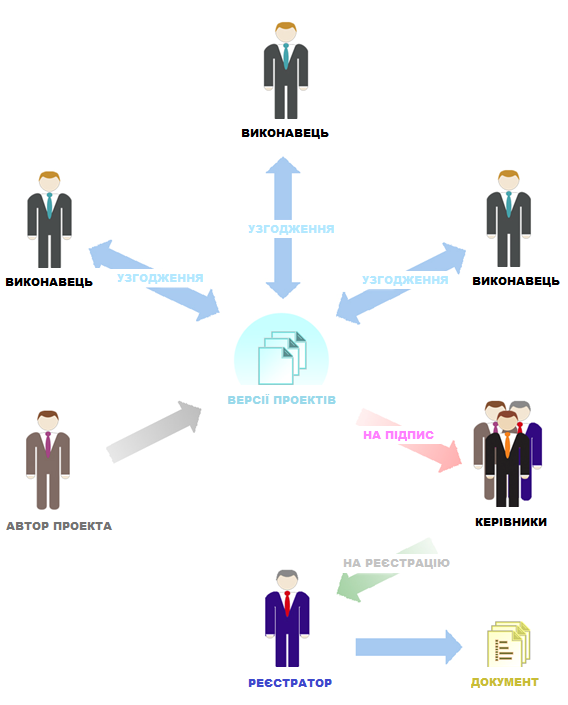
The order of execution, approval, signing and registration; registration in several offices; creating a document from a draft.
A virtual structure of the organisation, a role model, acting in place of colleagues and distribution of access to shared resources.
Internal mailboxes of the users on your domain, receiving and sending mail of external services.
Signing of documents and fields: integrity and authenticity, verification on opening.
Document route
Execution of a document begins with tasks for the performers: a route is an ordered set of such tasks (route points). The tasks arrive in the "Incoming documents" folders of the employees.
Route points are executed in parallel or in sequence. Route templates can be tied to a department or to the whole organisation, and a saved route can be reused for another document.
Your own document types without programming
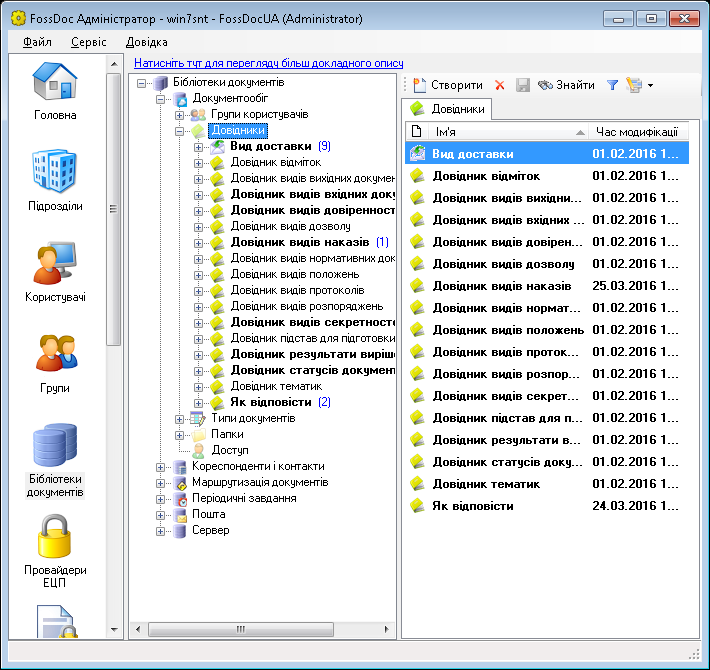
Document libraries are sets of objects (folders, document types, reference books) that implement the business logic of FossDoc. The administrator can create document types and fields, use existing types to create new ones and design print templates in Microsoft Word format.
System modules
You decide which functions the document management system supports: choose the modules it will consist of.
Solving document management tasks
You can decide which functions your document management system supports by choosing the modules it consists of. The modules are divided, roughly, into several groups by purpose:
The main module that makes the system work. It lets you create your own solutions and document types, add fields to documents, rename fields and gives access to the programming interface of the platform, and more. Learn more
It stores all tasks, draft documents, the documents themselves and reference books in a single database, accessed through the document card interface. Powerful search tools let you set search conditions of any complexity and view the documents attached or linked to the document found. Learn more
It lets both the assistant of a manager and the manager prepare resolutions for a document, attach files to a resolution when needed, choose the performers of the resolution and create tasks for them, set the order in which the tasks are executed and start the route of execution of the resolution. Learn more
It implements the creation of a document from its draft and of a new draft from an existing document. It is responsible for creating a draft, its approval, versioning of the draft, signing the draft and registering a document based on the draft. Learn more
It reminds you or other users of any event (a meeting, a birthday, sending a letter, the need to execute a document and so on) after a given period of time. It starts periodic execution and control of a document. Recurrence is supported (for example, remind once a week or a month). Learn more
It handles the flow of internal memos: creating and registering a memo, sending it along a route, registering it in the office of the department, adding a resolution, creating a reply memo and registering the reply. Learn more
It records the handing over of paper originals or copies of documents to the employees who use the system, and the filing of paper documents to a case file. Learn more
It implements control over the execution of tasks on documents by the users. The system shows controlled documents in the document list with a flag whose colour depends on the state of execution relative to the control dates: planned and actual. Controlled tasks are placed in a separate folder where the staff of the control department can process them. Printing of control cards is provided. Learn more
It handles citizen appeals. As with an incoming letter, a reply letter can be created for an appeal using the creation of a document from a draft. You can also check whether the applicant has appealed in the past. Learn more
Support of additional functions
It provides the digital signature. You can sign documents and their fields with a digital signature, which guarantees the integrity and authenticity of the document. Nobody but the author of a document can change it without this becoming known when the signature is verified. Learn more
It lets the user work with the system through an ordinary web browser. The web interface and the work with it are fully similar to the FossDoc Client application. Learn more
It integrates the FossDoc server with the FossMail e-mail. With FossMail you can send documents to remote departments that cannot work with the main server online. For banks it supports processing of the mail of the NBU: the module recognises the e-mails of the NBU automatically and converts them into "Incoming letter" documents, which are sent to the office for registration and further work. Learn more
The Internet mail module lets users send and receive mail through external mail services. The FossDoc server checks and receives the mail automatically and stores it in the database of the system. The user sees the mail in the "Mail folders". The module also lets you create and maintain "internal" (local) mailboxes of the users. Learn more
It automates the work of the assistants of employees; in particular, documents can be processed first by the assistant and then by the manager. Learn more
It allows simple arithmetic operations and some mathematical functions to calculate the values of document fields from the values of other fields. Learn more
It notifies users by e-mail about changes of the status of the documents that take part in the routes concerning them. For example, a notice about a new document received for execution, or an advance notice that the deadline of a task on a document is expiring.
With this module you can organise video communication between the employees of your organisation who use FossDoc.
This module lets different organisations exchange documents through the Derzhinformresurs service. Learn more
The module publishes documents from the FossDoc system on a site of the customer (a web portal). It is supplied only with commercial versions of the system. Learn more
This module recognises text when scanning from the document card and is supplied only with commercial versions of the system. Learn more
Extended administrator features
It logs the changes that users made to documents of the chosen type: the author, the fields that were changed and the values of these fields before and after the change. Learn more
It keeps statistics of work with a document. It records the time of the first and the last access of the users to a document and calculates the total time each user worked with the document and the amount of information that each user changed. Learn more
It lets users log in with the authorisation of a Windows domain and simplifies deployment of the system on the client workplaces. Learn more
It logs all actions on all objects of the system. Unlike History, which tracks changes in documents of a given type, audit records every possible change, including users logging in and out, creation and deletion of any objects (such as folders and new users) and all actions, including those of the administrator. Audit logs can be used to analyse and settle any disputed situation with the actions of users. Archive server: it exports documents from the database into external files that are then loaded into another (archive) server. In this way "finished" documents can be archived and the main server freed from "extra" documents, to keep it running at optimum speed. Learn more
DBMS support
Unlike the modules listed above, the package can include only one of the modules below:
It connects the platform to the Microsoft SQL Server 2005 Express Edition DBMS.
It connects the platform to the popular free MySQL DBMS.
It connects the platform to the Microsoft SQL Server DBMS.
It connects the platform to the Oracle DBMS.
How much it costs
Choose the modules and the number of users and the price is calculated at once.
Try FossDoc at work
Install the demo version and see how the system works in your organisation.