Document functions
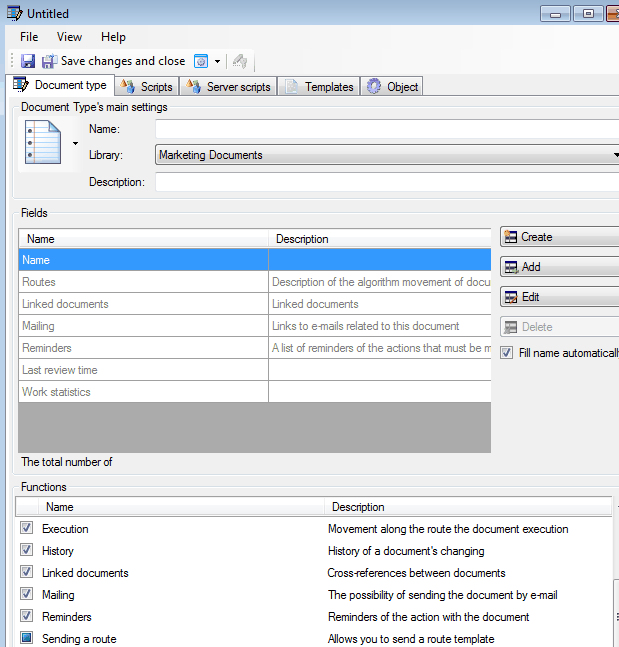
Let’s determine functions that will be present in our document type “Contractor”.
Available functions have following purposes:
- **“Attached Files” ** - allows attaching files to the document;
- **“Execution” ** - allows sending document by execution route. It means that document can be sent to another user with commission;
- **“History” **- allows turning on history tracking of document;
- “Sending on a route”- Allows connecting routes;
- **“Mailing” ** - allows attaching links to e-mails to the document;
- **“Linked documents” ** - allows attaching documents to the current document;
**“Approval” ** - allows approval of document.
Let’s consider that for our document following functions is necessary:
**“Attached files” ** - allows attaching any files to our document. For example, a copy of the certificate of registration of the business in government;
- **“Execution” ** - allows sending of document to other users;
- **“History” **- allows tracking of changes made by users worked with document.
Related articles
- How to Automate Your HR Department with FossDoc
- Customer Management with FossDoc
- Using FossDoc as a Database for Sociology Studies
- How to Use Document Assembly in Word and FossDoc
- Custom Business Solutions
- How to Manage Student Group Timetable with FossDoc
- Creating business application
- Defining solution boundaries for business applications
- Configuring access to folder
- Configuring access to folders
- Creating basic document type named “Marketing document”
- Creating of a document type
- Creating “Correspondents and contacts” warehouse
- Creating “Marketing documents” warehouse
- Creating of a documents library
- Customizing folder’s view
- Document fields
- Preparation of the document's route pattern
- Preparation of the route
- Testing the route
- Testing the solution
- Customizing folder’s view
- Using the mechanism of “Inherited document types”
- Using the mechanism of adding fields