Setting Up FossDoc Password Policy Settings
Protecting your system with a strong password is an integral part of security in any organization. Every administrator should study carefully all available security settings of the FossDoc server, such as password complexity, minimum length, etc.
In this article we'll look at how you can configure optimal security settings to be sure that your users are using strong passwords to prevent compromise of user accounts.
FossDoc has a special system dictionary where you can manage user password policy settings.
In extended FossDoc administrator open "System dictionaries" node and click on "Password policy". You'll see a page with all available security settings. These settings work pretty much the same as password policies for Windows domain.
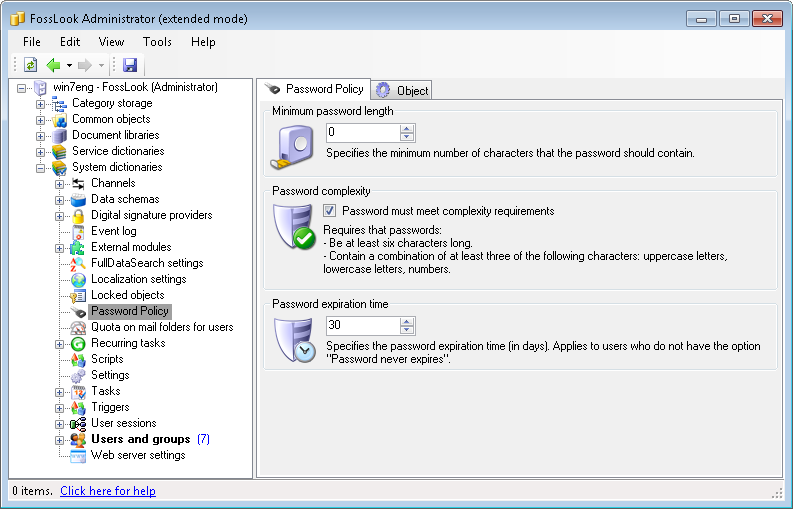
It uses the same settings as the Windows password policies. You can configure the following parameters:
- Minimum password length - the minimum number of characters that password can have
- Password complexity - specific password requirements (length should not be less than 6 characters, combination of uppercase and lowercase letters and numbers)
- Password expiration time - if in the user account settings password is set to never expire, this setting does not apply. Otherwise, you can specify the interval in days, to force user password change
Now, you may be wondering "What values should be set here?". Generally recommended settings for the security policy here are:
- Password length - minimum 8 characters
- Use password complexity
- Password expiration time: 180 days
If you're an administrator and have to manage FossDoc servers, it may be wise to enable necessary password policy rules. Even if you are not an administrator, but you work with FossDoc client, you should ask your administrator to enable this policy. This will add a certain protection from hacking user accounts on the server. Learn More About FossDoc Server Security