How to Remove Document Libraries and Types
 Removing Document Types Removing a Library If you're planning on removing a library or document type, always make sure that you have a working backup of your server. Once the library was removed, it cannot be restored.
Document Types Removing
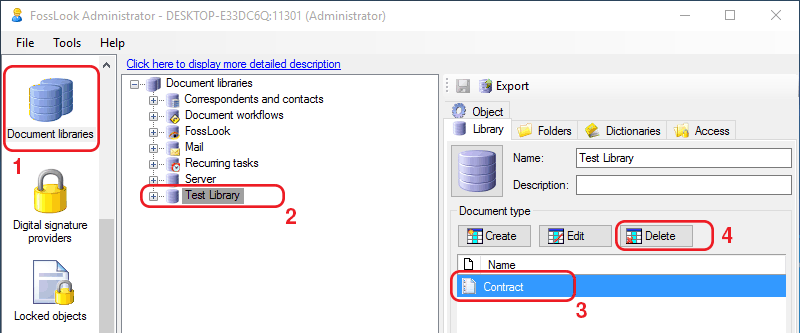
You can remove created document types from the system. To do this, just select the type of document you created in your library and click "Delete":
You will see a dialog:
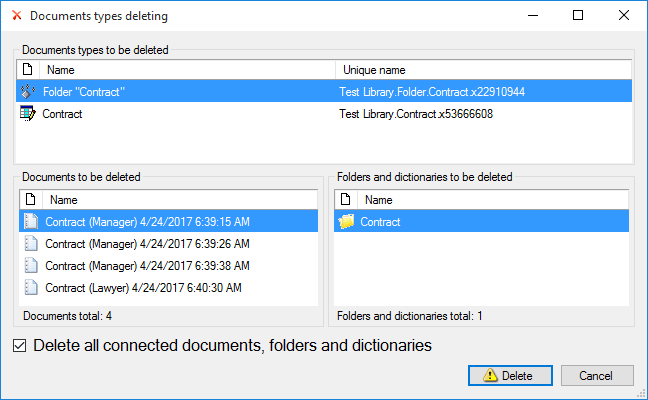
This dialog will show which objects will be deleted together with selected type of document, including folders, libraries and documents. If you finally decided to delete all listed objects, check the checkbox "Delete related documents ..." and click "Delete".
Removing a Library
The same way you can delete all library, just select library you created and click 'Delete'
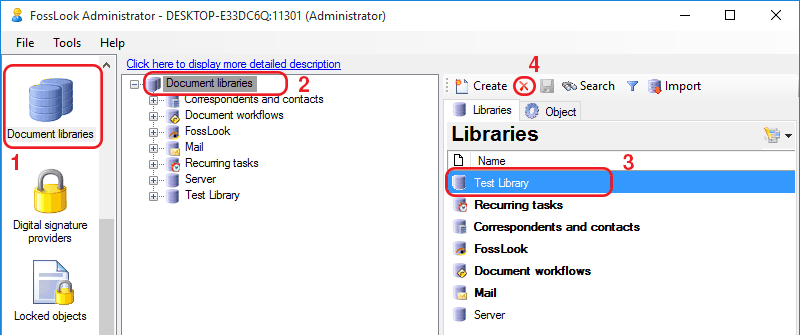
You will see a dialog:
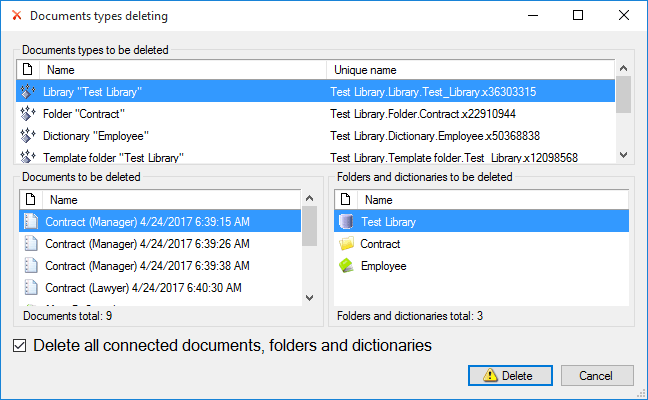
This dialog will show which objects will be deleted together with selected library, including folders, libraries, types of documents and documents. If you finally decided to delete all listed objects, check the checkbox "Delete related documents ..." and click "Delete". Find out how to work with FossDoc libraries
Related articles
- What is Electronic Document Management?
- Document's card description
- FossDoc Field Types
- AutoComplete fields with default values
- Using Field Calculations in FossDoc
- Creating a Custom Document Type
- Document Libraries
- Linking Related Documents Together
- Linked documents
- Virtual folders
- Movement of the document
- Document Publication in FossDoc
- How to Use the Document Search